Best CRM for Small Business
Looking for the best CRM for your small business? Learn how CRM software helps manage leads, improve follow-ups, streamline customer relationships, and support long-term growth.

Nancy J. Hassler
Most small business owners hit the same wall eventually. Things are going fine — leads are coming in, you're keeping up — and then one day a client mentions they never heard back from you. Or two people on your team send different answers to the same customer. Or you spend twenty minutes hunting through your inbox trying to find out where a deal stands.
That's when a CRM stops feeling optional.
The best CRM for small business doesn't have to be complicated. It just has to match how you actually work — your sales cycle, your team size, the tools you're already using. The problem is that most comparisons either oversimplify the options or overwhelm you with features you'll never touch. This guide tries to do neither.
CRM Brands
Not all CRM tools are built for the same business. Before getting into features and pricing, it helps to understand the main categories — because picking the wrong type is one of the most common mistakes owners make.
Free CRM for small teams
A free CRM for a small business is often the right starting point, especially if you're just getting organized. You get contacts, a basic pipeline, task reminders, and sometimes email sync. Nothing fancy, but that's kind of the point.
Free plans work well for freelancers, solo founders, and very small teams where the sales process is still straightforward. The limits are real — most free tiers cap the number of users, records, or automations, but if you're just trying to stop losing leads, they can solve that problem without spending anything.
The honest downside: most businesses outgrow a free plan faster than they expect. What feels like enough in month one can start showing cracks by month six.
Simple CRM for everyday use
A simple CRM for small business makes sense when you need a tool people will actually open and use — not something that turns onboarding into a full training process.
Most small teams just need one place for contacts, deals, follow-ups, and notes. For agencies, consultancies, and service businesses, that's usually enough. The sales process is shorter, the team is lean, and visibility matters more than enterprise-level complexity.
Where simple tools struggle is deeper automation and advanced reporting. Once you need that, you'll feel the ceiling.
Sales CRM software
A sales CRM software for small business is built around keeping deals from stalling. You can see exactly where each prospect sits in your pipeline — who needs a follow-up call, who's waiting on a quote, who's been silent for two weeks.
This setup works best for businesses where speed and follow-up directly affect revenue. A home services company handling incoming bookings. A B2B team managing several stakeholders in one deal. A consultancy tracking multiple proposals at the same time.
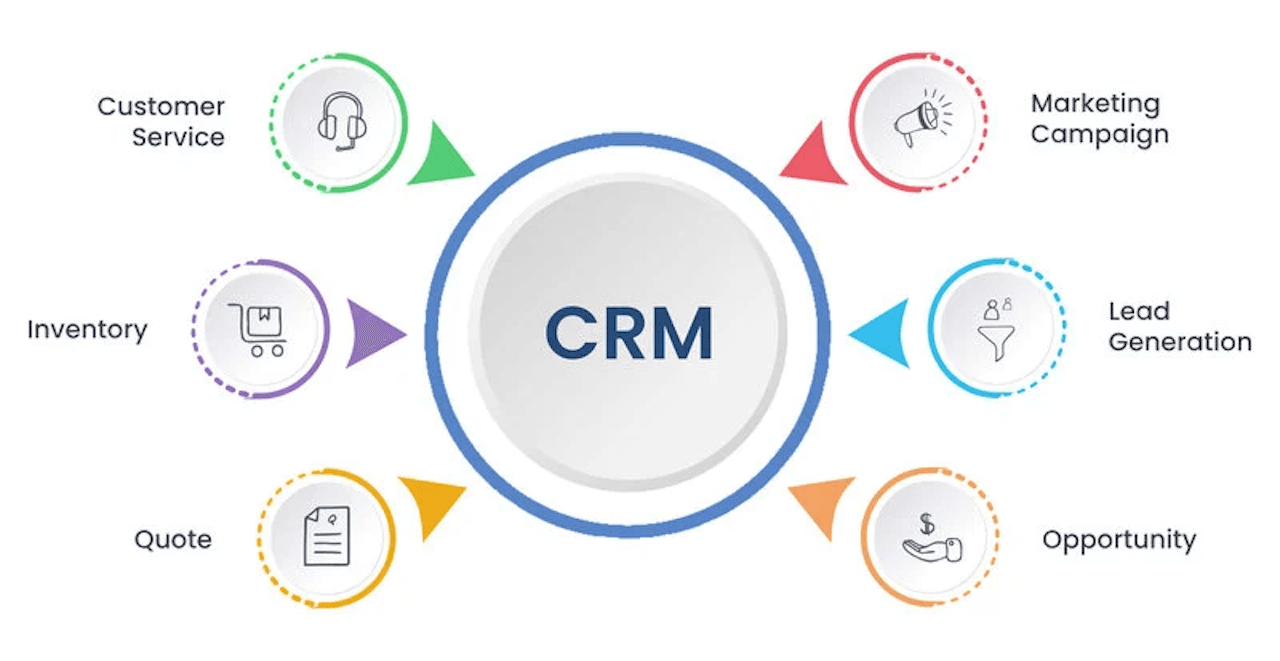
The main upside is transparency: rather than relying on memory, switching among disjointed spreadsheets, or scribbling on sticky notes, you have a single view of your pipeline and can immediately see what requires action next.
Unified platforms
A lot of CRM products bring email, messaging, automation, and task tracking under one roof. For teams tired of hopping between multiple tools, that consolidation cuts down on context switching and keeps everything in a single workspace.
But those all-in-one packages can be overkill for small teams. You may pay for functions you won’t use and waste time configuring automations instead of selling or serving customers. When you’re just starting, a leaner combination of tools usually wins.
Industry-specific CRMs
Other CRMs are built for a particular business model, whether that’s salons, contractors, eCommerce brands, or B2B service companies. Because they’re designed with a specific workflow in mind, they usually require less setup from the start.
A salon cares more about appointments and reminders than deal stages. An online store needs customer profiles connected to purchase history. A B2B company needs proposal tracking and visibility into decision-makers. If your workflow follows a clear pattern, industry-focused CRM software for small business can be a better fit than a generic platform.
What Is Small Business CRM Software?
CRM stands for Customer Relationship Management, but in practice it’s simply a single place to store every customer detail. Instead of rummaging through emails, spreadsheets, or chat histories, you open one profile and see everything at once: conversations, notes, tasks, opportunities, and scheduled follow-ups.
CRMs for small businesses also capture leads, structure sales activity, and stop important steps from slipping through the cracks — the point where spreadsheets usually stop working. For small teams the biggest gain is dependability: tasks aren't lost, leads don't go ignored, and customer history isn't locked in one person's head. If someone is unavailable or leaves, a teammate can pick up the conversation without starting over.
That's why many companies start looking for the best CRM for small businesses once lead volume becomes difficult to manage manually. Spreadsheets can store information, but they don't remind you to follow up or show which deals have stalled for weeks. A CRM does.
You don't manage follow-up or flag a deal that's gone cold for three weeks. A CRM does.
How Much Do Small Business CRMs Cost?
CRM pricing has a habit of looking more affordable than it actually is. The starting price is rarely the full story.
Here's a rough breakdown of where costs typically land:
- Starter paid plans — typically about $10–$30 per user/month.
- Mid-level plans — roughly $30–$70 per user/month, offering stronger automation and reporting.
- Premium tiers — include sophisticated workflows, deeper analytics, and often dedicated support.
A free CRM can cover the very early stage. But once you add multiple seats, need reliable reports, or want automations, paid plans become necessary — and the jump between tiers can be steeper than it seems. When evaluating vendors, don’t focus only on the headline per-user cost. Consider limits on users, automation credits, reporting access, integrations, and setup or support fees that raise the true price.
Look at:
- How many users the plan actually includes
- Whether there are limits on contacts or records
- What automation features are available (and which require an upgrade)
- What reporting looks like on the plan you'd actually use
- Whether integrations with your email, calendar, or website forms cost extra
- Any onboarding fees or required add-ons
A cheaper CRM that your team avoids using is more expensive than a pricier one they rely on daily. The question worth asking isn't "which plan is cheapest?" but "which plan fits how we actually work, and leaves room for the next twelve months?"

What Can a CRM Do for Your Small Business?
Used properly, a CRM does more than store contact details. It changes how your team handles leads, follows up, and communicates with customers — and the cumulative effect on revenue can be significant.
It stops leads from slipping through the cracks. Every inquiry goes into the system with a next step attached. That alone makes a difference, especially when lead flow is irregular. Busy days don't create missed opportunities if the system is holding the list.
It shows you where deals stall. A sales CRM software for small business gives you a real-time view of your pipeline. When twenty prospects sit in the same stage for too long, you know there's a problem — before it shows up in your numbers.
It makes follow-up consistent. This is probably where small businesses lose the most money: not because the offer is bad, but because nobody followed up at the right time. When reminders and tasks are assigned automatically, follow-up happens whether or not someone remembered to check their notes.
It creates a shared memory for the team. Notes, calls, emails, previous orders — all attached to one record. When a customer comes back after six months, your team can continue the conversation instead of asking them to start over. That kind of continuity matters more than most people think.
It reduces confusion when multiple people are involved. Without a CRM, one person thinks a lead was contacted. Another assumes the proposal went out. Nobody's sure. A CRM makes ownership visible and keeps everyone on the same page without a daily check-in.
It gives you something to actually measure. Which lead sources are converting? Where are deals getting stuck? How long does your average deal take to close? That kind of reporting turns your pipeline from a list into something you can make decisions with.
It makes post-sale communication simple. Many CRMs put email, chat, automations, and tasks in one place. That makes life easier by stopping constant switching between apps and keeping everything you need on hand. That's where CRM connects with broader goals like customer loyalty programs for small business and building genuine brand loyalty over time.
Is a CRM Worth It for a Small Business?
For most businesses, yes — once customer handling gets complicated enough that informal systems start creating real losses.
The case for a CRM isn't about adding structure for its own sake. It's about what happens when things don't get tracked. One forgotten lead, one unanswered renewal email, one slow response to a high-value prospect — those have real dollar amounts attached. A CRM helps prevent that pattern from becoming routine.
The moment it starts making sense is usually one of these:
- You're getting more than a handful of leads each week and can't track them reliably in your head or a spreadsheet
- More than one person is handling customer communication
- You're losing deals not because of the offer but because of inconsistent follow-up
- You want to grow without the chaos that usually comes with it
If the business is still genuinely tiny: a few clients, one person handling everything, a very simple process — a spreadsheet might be fine for now. But the transition point comes sooner than most people expect, and it's better to have a system in place before things fall through the cracks than after.
The best CRM for small business is rarely the one with the longest feature list. It's the one your team opens every day without being told to.
If you're thinking about growth beyond just CRM, it's worth connecting your customer management approach with your broader small business marketing challenges — and keeping an eye on business ideas that let you scale what's already working.

How to Choose the Right CRM
Start from your actual workflow, not the feature page. The best decisions here come from honest answers to a few questions:
- Work out the true monthly expense. Calculate the cost of the plan you’ll realistically need once you add users and features, not the cheap starter tier you’ll abandon in a few months.
- Will it plug into your existing tools? Verify integrations with email, calendars, website forms, booking systems, and any other apps you rely on before signing up.
- Can team members record activity fast? A CRM only helps if people update it in real time — during a call or immediately after a meeting — not later when they have spare time.
Example: a neighborhood plumbing business typically needs call logging, estimate generation, automated reminders, and visibility into repeat bookings. An online store needs order history tied to customer profiles. A B2B agency cares most about pipeline stages and team accountability. The right choice for each is different — and pretending otherwise leads to paying for the wrong tool.
Why This Matters for Growth
CRM keeps coming up in talks about small‑business growth because it’s the practical engine that runs day‑to‑day operations.
Rather than winning by outspending competitors, small firms win by being quicker to respond, consistent in follow‑ups, and easier to work with. A well‑used CRM makes all three straightforward.
When lead handling is structured and the process is documented in the system, adding a new person or running a bigger marketing campaign doesn't create a mess. You can grow without losing the quality of service that built the business in the first place.
That's why the right CRM isn't just an organizational tool, it's the infrastructure under everything else.
Final Takeaway
The best CRM for small business is the one that keeps your team organized without slowing them down. Start simple if your workflow is still basic. A free CRM for small business is often enough early on.
Move to stronger sales CRM software for small businesses once follow-up, pipeline visibility, and team coordination become harder to manage manually.
Don't choose based on feature volume. Consider all-in-one platforms only when your team is big enough to actually use what those tools offer.
The goal isn't the most sophisticated system. It's the one that makes your business easier to run every single day.
If you want to connect customer management with smarter local marketing, create a business account on Loca and start building a system that supports growth from day one.